
Universal Asynchronous Receiver-Transmitter (UART)
Laboratory Manual
The lab manual contains the full theory, circuit diagrams, and requirements for this experiment - keep it open while you work. Download Experiment 10 PDF
Target device: TM4C123GH6PM
Configuration Steps
Configuring UART0 on the TM4C123 microcontroller involves two stages.
GPIO Pin Configuration
- Enable the clock for the UART0 module and GPIO Port A by setting the appropriate bits in the
RCGCUARTandRCGCGPIOregisters. - Enable the alternate function on PA0 (RX) and PA1 (TX) using the
GPIOAFSELregister. - Configure the UART function encoding in the
GPIOPCTLregister (encoding = 1 for UART). - Enable the digital function for PA0 and PA1 by setting bits in the
GPIODENregister.
UART Module Setup
- Disable the UART by clearing all bits in the
UARTCTLregister to prevent undefined behavior during configuration. - Calculate the baud rate divisor values (for 115200 baud at 50 MHz:
IBRD = 27,FBRD = 8). - Write the integer baud rate divisor to the
UARTIBRDregister. - Write the fractional baud rate divisor to the
UARTFBRDregister. - Configure the line control register (
UARTLCRH) for 8 data bits, no parity, one stop bit, and FIFO enable (value =0x70). Writing to this register latches the baud rate configuration. - Select the clock source by writing to the
UARTCCregister (0 = system clock). - Enable the UART, transmitter, and receiver by setting the UARTEN, TXE, and RXE bits in the
UARTCTLregister.
Example: UART Echo Server
The code is split into three files:
uart.h: Function prototypes and pin definitionsuart.c: Implementation of UART initialization, read, and write functionsmain.c: Echo server application
#include <stdio.h>
#include "TM4C123.h"
#include "uart.h"

int main(void) {
    UART0_Init();
    UART0_WriteString("Hello World!\r\n");  // Send greeting with newline

    while (1) {
		char buff[MAX_STR_LEN];
		UART0_ReadString(buff, MAX_STR_LEN);

		UART0_WriteString("Received: ");
		UART0_WriteString(buff);
		UART0_WriteString("\r\n");
    }
}#include "uart.h"
void UART0_WriteChar(char c) {
while ((UART0->FR & (1 << 5)) != 0); // Wait until TX FIFO is not full (TXFF bit 5)
UART0->DR = c; // Write character to Data Register
}
void UART0_WriteString(char *str) {
while (*str) { // Loop through each character until null terminator
UART0_WriteChar(*(str++)); // Send each character
}
}
void UART0_Init() {
SYSCTL->RCGCUART |= (1 << 0); // Enable clock to UART0 module
SYSCTL->RCGCGPIO |= (1 << 0); // Enable clock to GPIO Port A
GPIOA->AFSEL |= U0_RX | U0_TX; // Enable alternate function on PA0 (RX) and PA1 (TX)
GPIOA->PCTL |= (1 << 0) | (1 << 4); // Configure PA0 and PA1 for UART (U0RX/U0TX)
GPIOA->DEN |= U0_RX | U0_TX; // Enable digital function for PA0 and PA1
UART0->CTL = 0; // Disable UART0 while configuring
UART0->IBRD = 27; // Set integer baud rate divisor for 115200 baud @ 50MHz
UART0->FBRD = 8; // Set fractional baud rate divisor
UART0->LCRH = 0x70; // 8 data bits, no parity, one stop bit, FIFOs enabled (WLEN=0x60 | FEN=0x10)
UART0->CC = 0; // Use system clock for UART
UART0->CTL = (1 << 0) | (1 << 8) | (1 << 9); // Enable UART0, TX and RX
}
char UART0_ReadChar(void) {
while (UART0->FR & (1 << 4)); // Wait while RX FIFO empty (RXFE bit 4)
return (char)(UART0->DR & 0xFF); // Return received character
}
void UART0_ReadString(char *buffer, int maxLen) {
int i = 0;
char c;
while (i < (maxLen - 1)) { // Leave space for null terminator
c = UART0_ReadChar();
if (c == '\r' || c == '\n') { // End of input
break;
}
buffer[i++] = c;
}
buffer[i] = '\0'; // Null terminate the string
}#ifndef UART_H
#define UART_H
#include "TM4C123.h" // Or your MCU's main header
#define U0_TX ( 1 << 1 )
#define U0_RX ( 1 << 0 )
#define MAX_STR_LEN 50
void UART0_WriteChar(char c);
void UART0_WriteString(char *str);
char UART0_ReadChar();
void UART0_ReadString(char *buffer, int maxLen);
void UART0_Init();
#endif // UART_HUART0_Init initializes the UART0 module. UART0_WriteChar and UART0_ReadChar transmit and receive single characters, and UART0_WriteString/UART0_ReadString build on them to handle whole lines. The main loop prints a greeting, then echoes back every line it receives, prefixed with Received: . To communicate with the microcontroller, use a terminal program on your PC such as PuTTY to send and receive data over the serial port. Make sure the baud rate and other parameters match the configuration in your code. The following image shows how to set up the serial connection in PuTTY:
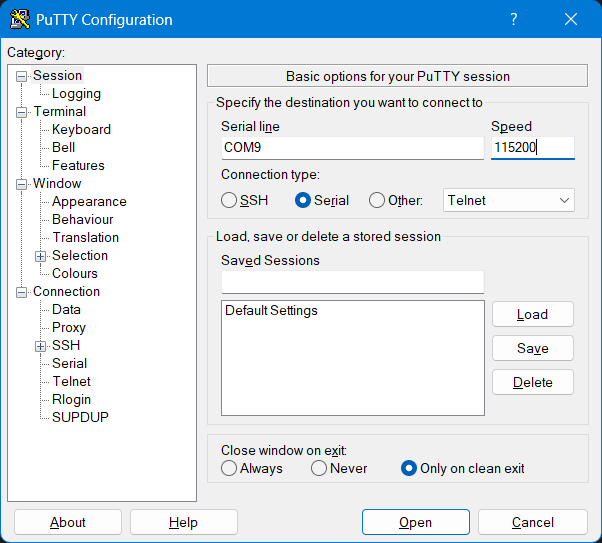
Replace the COM port with the one assigned to your TM4C123G LaunchPad. You can find it in Device Manager under Ports (COM & LPT). The baud rate must match the one set in your code (e.g., 115200).