
Analog-to-Digital Converter (ADC)
Laboratory Manual
The lab manual contains the full theory, circuit diagrams, and requirements for this experiment - keep it open while you work. Download Experiment 9 PDF
Target device: TM4C123GH6PM
Examples
This section demonstrates how to configure and use the ADC module on the TM4C123 microcontroller using both polling and interrupt-driven sampling methods. A potentiometer is used as a controllable analog input source by wiring its terminals to 3.3 V and ground, with the adjustable rotor connected to an ADC input such as AIN0 (PE3). Rotating the potentiometer varies the rotor voltage between 0 V and 3.3 V, allowing you to generate different analog levels and observe the corresponding ADC conversion results.
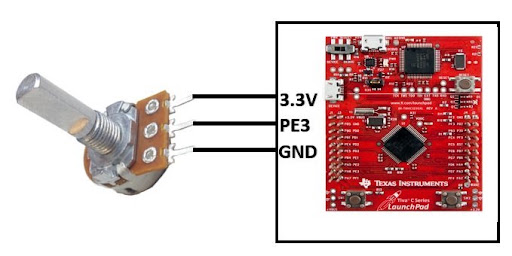
Example 1: Single ADC Channel Reading (Polling Method)
In this example, you will configure the ADC to read a single analog input channel (AIN0) using sample sequencer 3 (SS3) and turn on an LED if the voltage exceeds a certain threshold.
#include "TM4C123.h"
#define GREEN_LED 1 << 3
volatile unsigned int adc_value;
int main(void)
{
    SYSCTL->RCGCGPIO |= (1 << 4); // Enable Clock to GPIOE or PE3/AN0
    SYSCTL->RCGCADC |= (1 << 0);  // AD0 clock enable

    GPIOE->AFSEL |= (1 << 3);  // enable alternate function
    GPIOE->DEN &= ~(1 << 3);   // disable digital function
    GPIOE->AMSEL |= (1 << 3);  // enable analog function
    GPIOE->DIR &= ~(1 << 3);   // clear direction bit (don't-care once AMSEL is set, but good practice)

    ADC0->ACTSS &= ~(1 << 3);            // disable SS3 during configuration
    ADC0->EMUX &= ~0xF000;                // Software Trigger
    ADC0->SSMUX3 = 0;                    // get input from channel 0
    ADC0->SSCTL3 |= (1 << 1) | (1 << 2); // take one sample at a time, set flag at 1st sample
    ADC0->ACTSS |= (1 << 3);             // enable ADC0 sequencer 3

    SYSCTL->RCGCGPIO |= 0x20; // turn on bus clock for GPIOF
    GPIOF->DIR |= GREEN_LED;       // set GREEN pin as a digital output pin
    GPIOF->DEN |= GREEN_LED;       // Enable PF3 pin as a digital pin

    while (1)
    {
        ADC0->PSSI |= (1 << 3);            // initiate SS3 conversion
        while ((ADC0->RIS & (1<<3)) == 0);      // Wait untill sample conversion completed
        adc_value = ADC0->SSFIFO3;         // read adc coversion result from SS3 FIFO
        ADC0->ISC = (1<<3);                     // clear coversion clear flag bit

        if (adc_value >= 2048)
            GPIOF->DATA |= GREEN_LED; // turn on green LED
        else if (adc_value < 2048)
            GPIOF->DATA &= ~GREEN_LED; // turn off green LED
    }
}
Example 2: Reading Internal Temperature Sensor
In this example, you will configure the ADC to read the internal temperature sensor using sample sequencer 3 (SS3) and display the temperature value on the debugger using the Watch window.
- Start a debug session: After building the program successfully, start a debug session in Keil uVision IDE (Ctrl + F5).
- Add variables to the Watch window: select the variable name in the code, right-click, and choose "Add to Watch", or enter the variable name in the Watch window manually.
- Run the program: Use the "Run" button (F5) to execute the program. The Watch window will update with the current values of the monitored variables.
#include "TM4C123.h"

volatile unsigned int adc_value;
volatile float temp;

void ADC0SS3_Handler(void)
{
    adc_value = ADC0->SSFIFO3 & 0xFFF; // Read 12-bit ADC value from FIFO
    temp = 147.5 - (75 * 3.3f * adc_value)/ 4096; // Convert to temperature in Celsius
    ADC0->ISC = (1<<3); // Clear SS3 interrupt flag
}

int main(void)
{
    SYSCTL->RCGCGPIO |= (1 << 4); // Enable clock to Port E
    SYSCTL->RCGCADC |= (1 << 0);  // Enable clock to ADC0

    GPIOE->AFSEL |= (1 << 3);  // Enable alternate function on PE3
    GPIOE->DEN &= ~(1 << 3);   // Disable digital I/O on PE3
    GPIOE->AMSEL |= (1 << 3);  // Enable analog input on PE3
    GPIOE->DIR &= ~(1 << 3);   // Clear direction bit (don't-care once AMSEL is set, but good practice)

    ADC0->ACTSS &= ~(1 << 3);            	// Disable SS3 during configuration
    ADC0->EMUX |= 0xF000;               	// Set SS3 to continuous sampling mode
    ADC0->SSMUX3 = 0;                    	// Configure SS3 to sample AIN0 (PE3)
    ADC0->SSCTL3 |= (1 << 1) | (1 << 2) | (1 << 3); 	// Set end of sequence, enable interrupt, enable temperature sensor

    ADC0->IM |= (1 << 3);        // Enable SS3 interrupt mask
    NVIC_EnableIRQ(ADC0SS3_IRQn); // Enable ADC0 SS3 interrupt in NVIC

    ADC0->ACTSS |= (1 << 3);  // Enable SS3

    while (1) {} // Wait for interrupts
}
Code Explanation
GPIO/ADC Setup: Both examples follow the same pattern: enable the RCGCGPIO and RCGCADC clocks, then put PE3 into analog mode (AFSEL, DEN, AMSEL, DIR).
Sequencer Configuration: ADC0->ACTSS disables SS3 while it's being configured, ADC0->EMUX selects the trigger source (software in Example 1, continuous in Example 2), ADC0->SSMUX3 = 0 selects input channel AIN0, and ADC0->SSCTL3 marks the sample as the end of the sequence (and, in Example 2, additionally selects the internal temperature sensor and enables its per-sample interrupt).
Example 1 — Polling: The main loop writes ADCPSSI to start a conversion, spins on ADCRIS until the raw-status bit for SS3 is set, reads the result from ADCSSFIFO3, and clears the flag via ADCISC, all under software control with no interrupt involved.
Example 2 — Interrupt-Driven: ADC0->IM unmasks the SS3 interrupt and NVIC_EnableIRQ(ADC0SS3_IRQn) enables it in the NVIC. Because EMUX is set to continuous mode, the ADC keeps sampling on its own and ADC0SS3_Handler() fires after every conversion: it reads SSFIFO3, converts the result to a temperature, and clears the interrupt flag via ADCISC. The main loop does nothing but wait.
Tasks
Task 1: Timer-Based Temperature Measurement
Modify Example 2 so that the ADC sampling is triggered by a timer every second, instead of using continuous sampling mode. Connect an analog temperature sensor (e.g., TMP36) to an ADC input channel (such as AIN0 on PE3). Configure the ADC to read the sensor voltage on each timer trigger and calculate the corresponding temperature. Monitor the temperature values in real time by adding the variable temp to the Watch window in the debugger.
Task 2: Comparing Two ADC Channels Using Dual Modules
Extend Example 2 to read two different analog inputs using separate ADC modules: use the ADC0 module to sample AIN0 (PE3) and the ADC1 module to sample AIN1 (PE2), both with sample sequencer 3 (SS3). Configure both ADC modules to use interrupts so that each conversion triggers its respective ISR. In the interrupt handlers, compare the two ADC values and use the result to control LEDs on GPIOF: for example, turn on the green LED if ADC0's value is higher, or turn on the red LED if ADC1's value is higher. This demonstrates simultaneous sampling using both ADC modules. Display both ADC values in the debugger Watch window to observe the comparison in real time.