
Procedures and the Stack
This experiment builds on the branching and loop patterns from Experiment 3 to write modular assembly code. You will define procedures, follow the AAPCS calling convention for arguments, return values, and register preservation, and use the stack to save the return address and working registers across nested and recursive calls. By the end of this lab, you will be able to split a program into reusable procedures that call each other safely.
Objectives
- Call and return from procedures using
BLandBX LR. - Apply the ARM Procedure Call Standard (AAPCS) to pass parameters, return results, and decide which registers must be preserved.
- Use
PUSHandPOPto save and restore callee-saved registers andLRon the full descending stack. - Implement nested and recursive procedures that manage the stack correctly.
Background
ARM Architecture Procedure Call Standard (AAPCS)
Procedures are reusable blocks of code that encapsulate a specific task. They promote modular design, code reuse, and clearer program structure. In ARM assembly, procedures are implemented using branch-and-link instructions along with register usage conventions defined by the ARM Architecture Procedure Call Standard (AAPCS).
The AAPCS is the set of rules that define how functions exchange data and how registers must be preserved during a procedure call:
- R0–R3: Hold the first four parameters.
R0also holds the return value. Caller-saved. - Stack: Any additional parameters beyond the first four are passed on the stack.
- R4–R11: Must be preserved by the callee. If a procedure uses them, it must save and restore them.
- R12 (IP): Intra-procedure-call scratch register. Caller-saved — a callee may freely overwrite it, so (like R0–R3) never assume it survives a
BL. - SP (R13): Stack pointer, always points to the current top of the stack.
- LR (R14): Link register holds the return address. Caller-saved.
Note: Callees are the procedures being called, while callers are the ones calling the procedure.
Procedure Templates
A procedure is entered with a BL (branch-with-link) instruction, which stores the return address in the link register LR. The callee returns by branching to LR (e.g., BX LR). By the AAPCS, the first four arguments are passed in R0--R3 and the primary return value is placed in R0.
Basic Procedure Template
Example: simple procedure that expects two integers in R0 and R1 and returns their sum in R0.
AddTwo  PROC
        ADD R0, R0, R1   ; return R0+R1 in R0
        BX  LR
        ENDP
Note: The PROC and ENDP directives help define the start and end of a procedure and they could be safely omitted.
Procedure with Preserved Registers
When a procedure uses callee-saved registers (R4-R11), it must preserve their original values by saving them on the stack and restoring them before returning:
ProcessArray PROC
        PUSH    {R4-R6, LR}     ; Save used registers and LR
        MOV     R4, R0          ; Save array pointer
        MOV     R5, R1          ; Save array length
        MOV     R6, #0          ; Initialize counter

        ; Process array using R4, R5, R6...

        MOV     R0, R6          ; Return counter value
        POP     {R4-R6, PC}     ; Restore registers and return
        ENDP
Nested Procedure Calls
When one procedure calls another, the link register (LR) must be preserved, otherwise the return address would be lost. This is done by pushing LR onto the stack before making another call.
OuterProc
        PUSH    {LR}            ; Save return address
        BL      InnerProc       ; Call inner procedure
        MOV     R1, R0          ; Use return value
        POP     {PC}            ; Return to caller

InnerProc
        MOV     R0, #42         ; Return value
        BX      LR              ; Return
Stack Model (Full, Descending)
There are four common stack models based on two characteristics: whether the stack is full or empty, and whether it grows up (ascending) or down (descending).
- Full Ascending: SP points to the last used location; stack grows toward higher addresses.
- Empty Ascending: SP points to the next free location; stack grows toward higher addresses.
- Empty Descending: SP points to the next free location; stack grows toward lower addresses.
- Full Descending: SP points to the last used location; stack grows toward lower addresses.
The ARM Cortex-M4 uses a full descending stack, meaning:
- The stack pointer (
SP) points to the last used location (full). - The stack grows toward lower memory addresses (descending).
Stack Operations
The Cortex-M4 provides PUSH and POP instructions that automatically update the stack pointer (SP) and allow saving or restoring multiple registers in a single instruction. These operations are essential for implementing procedure calls, local variables, and context switching.
PUSH
The PUSH instruction saves one or more registers onto the stack in a single operation. When executed, the stack pointer (SP) is decremented to reserve space, and the specified registers are written to consecutive memory locations starting from the new SP value. Rule: PUSH stores registers on the stack, with the lowest-numbered register placed at the lowest memory address and the highest-numbered register placed at the highest memory address. This guarantees a consistent and predictable memory layout for saved contexts.
Example:
PUSH {R4, R0, R2, LR}
Even if the list appears unordered, values are laid out by register number: R0 (lowest address), then R2, R4, and LR (highest address). Each register occupies 4 bytes, so SP decreases by 16 bytes in total. The program counter (PC) cannot be pushed by this instruction.
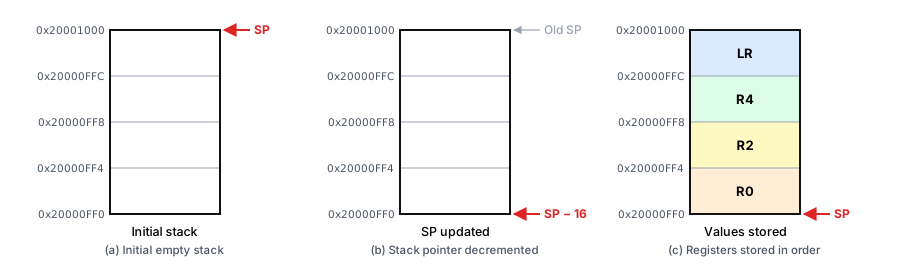
Stack operation sequence for PUSH {R4, R0, R2, LR}
Explanation: Figure [fig:stack-push-sequence](a) shows the empty stack with SP at the top (highest address). When PUSH executes, the processor decrements SP by 16 bytes to reserve space for four registers (Figure [fig:stack-push-sequence](b)). Finally, in Figure [fig:stack-push-sequence](c), values are stored according to the rule: the lowest-numbered register (R0) at the lowest address, then R2 and R4, and the highest-numbered (LR) at the highest address. Because the stack grows downward, SP points to the last written word after the operation.
POP
The POP instruction restores one or more registers from the stack. Conceptually, the processor reads each value from the addresses currently covered by SP and then releases that stack space. Rule: POP loads registers from the stack such that the lowest-numbered register is restored from the lowest memory address, and the highest-numbered register from the highest memory address. After all specified registers are restored, SP has increased by 4 bytes per register.
Example:
POP {R6-R8}
This restores R6, then R7, then R8 from successively higher addresses; the stack pointer increases by 12 bytes overall. If PC is included in the list, the loaded value becomes the new program counter, returning from the current procedure.
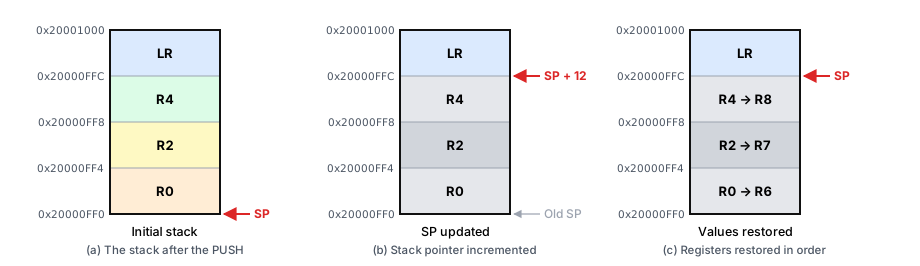
Stack operation sequence for POP {R6-R8}
Explanation: In Figure [fig:stack-pop-sequence](a), the stack contains values saved earlier. Executing POP {R6-R8} reclaims 12 bytes of stack space (three registers) by moving SP upward in memory (Figure [fig:stack-pop-sequence](b)). Then, as shown in Figure [fig:stack-pop-sequence](c), registers are restored following the rule: the lowest-numbered register (R6) comes from the lowest address, followed by R7 and R8 from higher addresses. After the last load, SP points to the top of the reclaimed block, completing the reversal of the earlier push.
Note: This figure deliberately reuses the stack contents from the earlier PUSH {R0, R2, R4, LR} example, relabeling them R6/R7/R8 to illustrate that POP restores registers by address, not by the name they were pushed under — it is not meant to represent the same code sequence continuing.
Examples
Setting up the project
This experiment is written in assembly and runs in Keil's simulator. If you haven't made a project yet, follow the Assembly Project guide first.
Example 1: Nested Uppercase Counter
This example demonstrates a nested call: CountUpperNested(ptr) scans a null-terminated string and calls IsUpper(ch) for each character. It shows saving/restoring LR and using callee-saved registers (R4 for the running count, R5 for the scan pointer). Both values must survive the BL IsUpper call, so under the AAPCS they cannot be kept in caller-saved registers like R0–R3. Compare it with Example 2 of Experiment 3, which counts the same letters inline with no procedures.
        AREA    RESET, CODE, READONLY
        EXPORT  __Vectors
__Vectors
        DCD     0x20001000          ; Initial SP
        DCD     Reset_Handler       ; Reset vector
        ALIGN
        AREA    MYCODE, CODE, READONLY
        ENTRY
        EXPORT  Reset_Handler
IsUpper                              ; IsUpper(R0 = ch) -> R0 = 1 if 'A'..'Z', else 0
        CMP     R0, #'A'
        BLT     not_upper
        CMP     R0, #'Z'
        BGT     not_upper
        MOV     R0, #1
        BX      LR
not_upper
        MOV     R0, #0
        BX      LR
CountUpperNested                    ; CountUpperNested(R0 = ptr) -> R0 = Upper Count
        PUSH    {R4, R5, LR}        ; save callee-saved regs + return address
        MOV     R5, R0              ; R5 = ptr (callee-saved: must survive the BL below)
        MOV     R4, #0              ; R4 = count
cu_next
        LDRB    R0, [R5], #1        ; R0 = *ptr++; post-increment pointer in R5
        CBZ     R0, cu_done         ; if null terminator, finish
        BL      IsUpper             ; R0 = 0/1 based on 'A'..'Z' (R0-R3 are caller-saved: may be clobbered)
        ADD     R4, R4, R0          ; count += result
        B       cu_next
cu_done
        MOV     R0, R4              ; return count in R0
        POP     {R4, R5, PC}
Reset_Handler
        LDR     R0, =mystring
        BL      CountUpperNested
        LDR     R2, =UPPERCOUNT
        STR     R0, [R2]
STOP    B       STOP
        AREA    CONSTANTS, DATA, READONLY
mystring DCB    "Hello ARM World!", 0  ; Uppercase: H, A, R, M, W -> 5
        AREA    MYDATA, DATA, READWRITE
UPPERCOUNT  SPACE 4                    ; should be 5
        END
Check: Verify that UPPERCOUNT contains 5 for the test string.
Example 2: Integer to Decimal String with the Stack
UIntToStr(value, buf) converts an unsigned integer into a null-terminated decimal ASCII string and returns the number of digits in R0. It finds each digit by dividing by 10 (UDIV, then MLS for the remainder), and this produces the digits in reverse order, least-significant first. Pushing each digit and then popping them all back reverses that order again, because the stack is last-in, first-out. Each PUSH {R12} takes a full 4-byte word even though it holds only one character. Because every push is matched by a pop, SP returns to its starting value before the final POP {R4, PC}.
        AREA    RESET, CODE, READONLY
        EXPORT  __Vectors
__Vectors
        DCD     0x20001000          ; Initial SP
        DCD     Reset_Handler       ; Reset vector
        ALIGN
        AREA    MYCODE, CODE, READONLY
        ENTRY
        EXPORT  Reset_Handler
UIntToStr                           ; UIntToStr(R0 = value, R1 = buf) -> R0 = digit count
        PUSH    {R4, LR}            ; save callee-saved R4 and the return address
        MOV     R2, #0              ; R2 = digit count
        MOV     R3, #10             ; R3 = divisor
its_div
        UDIV    R4, R0, R3          ; R4 = value / 10
        MLS     R12, R4, R3, R0     ; R12 = value - (value / 10) * 10 = value % 10
        ADD     R12, R12, #'0'      ; digit -> ASCII character
        PUSH    {R12}               ; digits are produced least-significant first...
        ADD     R2, R2, #1          ; count++
        MOV     R0, R4              ; value = value / 10
        CMP     R0, #0
        BNE     its_div             ; repeat until value is 0 (value 0 still gives "0")
        MOV     R0, R2              ; return value = digit count
its_pop
        POP     {R12}               ; ...so popping returns them most-significant first
        STRB    R12, [R1], #1       ; *buf++ = character
        SUBS    R2, R2, #1          ; count--
        BNE     its_pop
        MOV     R12, #0
        STRB    R12, [R1]           ; null terminator
        POP     {R4, PC}            ; restore R4 and return (SP is back where it started)
Reset_Handler
        LDR     R0, =40213          ; value to convert
        LDR     R1, =NUMSTR         ; destination buffer in RAM
        BL      UIntToStr           ; R0 = 5, NUMSTR = "40213"
STOP    B       STOP
        AREA    MYDATA, DATA, READWRITE
NUMSTR  SPACE   12                  ; up to 10 digits + null (written before it is read)
        END
Check: Verify that R0 = 5 after the call, and open a Memory window at NUMSTR to confirm the bytes 34 30 32 31 33 00 ("40213"). Single-step the first loop with the Registers window open and watch SP drop by 4 for each digit. Then confirm that it climbs back during the second loop. Try the value 0 as well; the result should be "0".
Lab work
Lab work 1: Count Vowels with Procedures
Rewrite Lab work 1 of Experiment 3 as procedures:
- Create a procedure
IsVowelthat takes a character in R0 and returns 1 in R0 if it is a vowel (a, e, i, o, u, upper- or lowercase), and 0 otherwise. - Create a procedure
CountVowelsthat takes a string pointer in R0 and returns the number of vowels in R0, callingIsVowelfor each character. - Follow AAPCS conventions for parameter passing and register usage.
- Test it with the Experiment 3 string; the result must match your earlier answer.
Lab work 2: Factorial Calculation (Recursive)
Note on recursion
Example 1's nested call has one procedure calling a different one. In recursion, FactorialRec calls itself. Each call needs its own copy of LR (and of any register it modifies) preserved across the inner call. So every invocation must PUSH its own LR, and usually the current n or partial result, before recursing, then POP them back on the way out. Because each active call keeps its own saved values on the stack, the recursion unwinds in reverse order as each POP/BX LR returns to its caller.
Implement a recursive procedure to calculate the factorial of a non-negative integer:
- Create a procedure
FactorialRecthat takes a non-negative integer in R0 and returns its factorial in R0. - Use recursion to compute the factorial, with a base case that handles 0! = 1.
- Manage the stack appropriately to save and restore registers as needed.
- Follow AAPCS conventions for parameter passing and register usage.
- Test the procedure with several inputs (including 0 and 1) to verify correctness.